

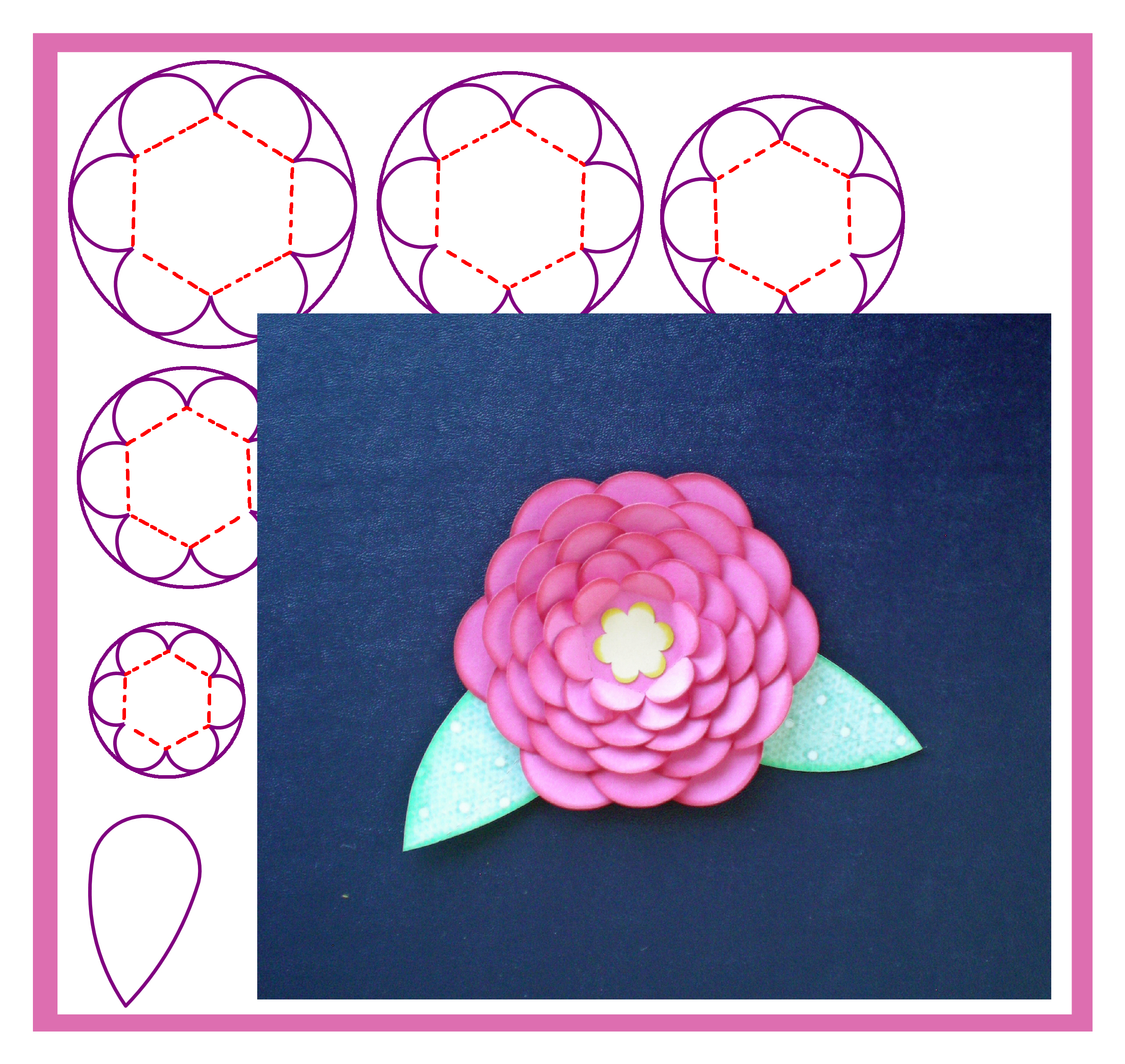
 I will admit that sometimes I am stumped when it comes to choosing a topic for Tricky Tuesdays. At those times, I usually just start playing with the Inspiration Studio Software hoping to come up with…Inspiration. That is how this lesson began. I was exploring the Draw Polygon tools and realized that I could easily make scalloped circles! Eureka! I had done this technique ages ago (Yes, I am a dinosaur when it comes to Pazzles!) and tucked it back in the furthest recesses of my mind. Was I ever excited when I remembered it.
I have taught lessons on making scallops before and can make really nice scalloped squares and rectangles. But making a perfectly spaced and even circle is an elusive thing. You can use the scallop scissors line but that seems to always add an adjustment bubble. I have also tried the method of placing smaller circles around a larger circle but that is always hit or miss.
This method of using a polygon is so simple and so PERFECT!!! First, draw a multi-sided polygon. Fewer sides make the scalloped circle resemble a flower. Draw a larger circle around the polygon as a guide for the scallops. Center the 2 together and use your move point tool to draw out the scallops. It is so EASY!!
Once I got going on this, I realized if I kept making the scalloped circles smaller and smaller, I could make a really pretty flower. Then I added kiss cuts to bend up the petals. (You know how you get on a roll and can’t stop?) Next I got out my chalk ink and shaded the edges, made some leaves and had an awesome flower.
I’ve made a video showing how to do this technique so be sure to watch it by clicking on the links below. And please…..don’t be angry with me because I didn’t show this until now…I can’t believe I waited this long either. 🙂
Scalloping away,
Chris


LOVE IT….I forgot I knew how to do this too…way to go Chris, this is awesome
The video is very clear and makes scallops and flowers seems so much easier. Thanks for the tutorial, enjoyed it very much:-)
Love this video it is so clear. A definite Eureka moment. I have been trying to make scallops but this technique is so easy.
Thanks so much.
Awesome trick! I’ve found my own ways to make scallop circles but this is so easy and the results are so consistent!
Loooove it! I am continually amazed at the creativity and versatility of the Inspiration and it’s users.
It all makes perfect sense! Thank you for a “new” way to simplify. We are always looking for shortcuts! Leave it to you Chris! 🙂
oh WOW! So incredible! thank you!!!!!
This is great.
Chris….Thank you so much for this wonderful file and totally awesome video!!!!
Bonnie
Bless you Chris thats taken all the hard work out for us newbie’s and I will practice making these with your awesome video
Chris x
That’s great – thank you for the video – can’t wait to try it!
Dee x
Thank you for the video, very easy to follow.
Wow! Thanks for the video. I just got my Inspiration yesterday and have a lot to learn!!
Wow, thanks so much Chris. This is great. Dana
Beautiful results!
I have only watched and read as my significant onther has practiced cutting depths and made a template for painting a “C” Hawk on our back board for the school spirit all small town people love to advertise. this makes a scrapbook page seem attainable! SRJ
What a well done tutorial. It was so easy to follow. Thanks!